


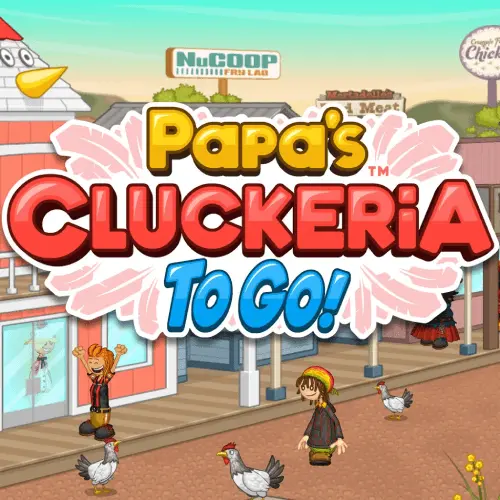
Papas Cluckeria
Papas Cluckeria is a casual restaurant time-management game centered on running a chicken sandwich shop. Each customer arrives with a specific order, and your job is to keep…
 Works on Desktop & Mobile
Tested By XoomGames
- Test date
- August 20, 2026
- Tested on
- Chrome 150
- Device
- Desktop
- Operating system
- macOS and Windows
- Game loaded successfully
- Yes
- Fullscreen works
- Yes
- Sound works
- Yes
- Save progress
- Local browser storage
- Mobile compatibility
- Partially tested
- Keyboard controls
- Working
- Controller support
- Not detected
- Average loading time
- 4.2 seconds
- Known issues
- Minor delay after entering fullscreen
Papas Cluckeria not loading?
- Refresh the page.
- Disable restrictive content blockers temporarily.
- Confirm JavaScript and WebGL are enabled.
- Clear the browser cache.
- Try another modern browser.
- Close unnecessary tabs.
- Switch off VPN if the game server is blocked.
- Use the Report a Problem button if the issue continues.
Related Games


Continue Playing
Daily Challenge

Play 7 minutes today in Papas Cluckeria.
Leaderboard
- 1Community rating4.4 ★
- 2Player likes553
- 3Total votes643
- 4Your local progress0%
Your progress is saved locally in this browser. No account required.
 Your progress is saved locally in this browser. No account required.
How to Play
Begin by paying attention to the first customer order. The order ticket is your reference point throughout the meal, so take a moment to understand what the customer expects before moving quickly through the kitchen. Papas Cluckeria is most manageable when you work from the order outward instead of guessing what should be made.
As more customers arrive, keep each ticket mentally separated. Start preparing food for a new order when it makes sense, but do not forget meals that are already cooking or ready for assembly. The goal is to overlap tasks efficiently: one order can be progressing while you check another, provided you return at the right moment.
- Read the incoming customer order carefully.
- Start the required food preparation for that ticket.
- Monitor the order while other customers arrive.
- Assemble the sandwich to reflect the request.
- Serve the completed meal without leaving finished orders waiting unnecessarily.
- Use the result of each shift to identify where your routine slowed down.
Accuracy should come before aggressive speed when you are learning. A fast action is only useful if it keeps the order correct. Once you recognize the usual rhythm of taking orders, preparing food, assembling sandwiches, and serving customers, you can begin to overlap those stages more confidently.
A helpful practical method is to scan the restaurant in a repeating cycle. Check the customer queue, review active food preparation, examine orders that are ready to finish, then return to the next priority. This prevents tunnel vision, where you focus on one sandwich and miss several other tasks. The best runs usually feel calm because the player is always aware of the next useful action.
Do not assume that every task deserves equal urgency. A completed meal waiting to be served may be more important than starting a brand-new order, while food already in progress may need attention before another customer ticket is reviewed. Learn the order flow, then adjust your priorities to the current kitchen situation.
On mobile: use on-screen buttons or gestures when the game supports them.
 On mobile: use on-screen buttons or gestures when the game supports them.
Controls
- ↑Jump
- ← →Move Left / Right
- ↓Crouch
- W / ↑Climb / Interact
- S / ↓Drop / Slide
Papas Cluckeria uses an on-screen game interface for selecting orders, preparing food, assembling sandwiches, and serving customers. Follow the visual prompts inside the game as you move between its restaurant tasks. The exact interaction details can depend on the version and device being used, so the game screen is the best guide for the current input method.
On a computer browser, use the available pointer-based interactions shown by the game to choose stations and complete preparation actions. On a touch-capable device, use the displayed touch controls where supported. Avoid relying on keyboard shortcuts or mobile-app instructions unless the version you are playing explicitly shows them.
- Use the order display as your accuracy reference.
- Select the active station or task shown on screen.
- Watch for visual feedback before moving to the next step.
- Recheck tickets before serving a completed sandwich.
Control precision matters because this is a service game. Slow down briefly when reading an order or making an assembly decision, then regain time by keeping the rest of the kitchen organized.
Game Progress & Challenges
Why Play This Game?
 Instant PlayPlay instantly in your browser.
 Free to PlayNo hidden fees.
About "Papas Cluckeria"
Papas Cluckeria is a casual restaurant time-management game centered on running a chicken sandwich shop. Each customer arrives with a specific order, and your job is to keep the kitchen moving while preparing food that matches what they asked for. The core challenge is not simply cooking one sandwich; it is organizing several active orders without letting waiting customers fall behind.
The game belongs to the familiar Papa's-style food-service format: read an order, prepare the requested meal, serve it, and aim for a smooth customer experience. Chicken sandwiches are the main menu focus, giving the game a distinct fast-food restaurant setting rather than a general café or bakery theme.
What makes the format satisfying is the balance between speed and accuracy. A rushed order can lead to mistakes, but spending too long perfecting one ticket can slow down the rest of the restaurant. Players who enjoy practical multitasking, food preparation themes, and score-focused service games can use each round to build a better routine.
Rather than treating every order as an isolated task, think of the restaurant as a queue-management puzzle. Keep track of what is cooking, what needs assembly, and which customer should be served next. That steady planning loop is the main reason Papas Cluckeria remains engaging for both quick sessions and longer attempts to improve service.
Gameplay
Papas Cluckeria turns a chicken restaurant shift into a sequence of small, connected decisions. Customers place sandwich orders, and the restaurant workload grows as more tickets arrive. Your objective is to prepare and serve those meals while keeping customers satisfied. Success comes from handling several orders in progress instead of waiting for one customer to be completely finished before starting the next.
The central gameplay loop is easy to understand: review the order, prepare the food, assemble it according to the request, and deliver it to the customer. The depth comes from timing. Cooking is only one part of the shift; an order must also be tracked until it is ready to serve. Good players learn to use waiting time productively by moving to another task rather than standing still.
Restaurant time-management games reward observation as much as speed. Notice which tickets have been waiting longest, which meal is closest to completion, and which task will prevent a bottleneck. If several customers are waiting, a small delay on one order can affect the entire queue. Building a repeatable sequence helps reduce that pressure.
- Order awareness: Read each request before committing to preparation.
- Kitchen timing: Avoid losing track of food while working on another ticket.
- Assembly accuracy: Match the customer request as closely as possible.
- Queue control: Serve completed orders promptly and keep the line moving.
The game also has a food truck option associated with its wider game experience. That detail adds variety to the restaurant-management theme and separates it from entries focused only on a fixed counter-service location. The most useful mindset is to treat every shift as a workflow puzzle: prepare ahead, check tickets often, and finish orders in an intentional sequence.
Platform
This page presents Papas Cluckeria as a browser-game experience, so the main goal is to start playing from a compatible web browser without treating the game as a separate restaurant-management app. A browser format is useful for players who want a casual game session on a computer and prefer to begin directly from a game page.
The wider game name also appears in a To Go edition, but browser access and app access are different ways of playing. If you are here to play in a browser, use the game area and the on-screen instructions supplied by the page rather than assuming that mobile-store information applies to every version.
For the smoothest session, allow the game to load fully before starting an order. Restaurant time-management gameplay depends on recognizing tickets and following preparation steps, so a comfortably sized screen and a stable browser session can make the interface easier to follow. If the game pauses or does not respond, refresh the page only after checking whether your browser has blocked game content.
Papas Cluckeria suits players looking for quick browser games with an easy-to-recognize objective: run the chicken sandwich restaurant, complete customer orders, and improve your service rhythm.
How to Play "Papas Cluckeria"
Begin by paying attention to the first customer order. The order ticket is your reference point throughout the meal, so take a moment to understand what the customer expects before moving quickly through the kitchen. Papas Cluckeria is most manageable when you work from the order outward instead of guessing what should be made.
As more customers arrive, keep each ticket mentally separated. Start preparing food for a new order when it makes sense, but do not forget meals that are already cooking or ready for assembly. The goal is to overlap tasks efficiently: one order can be progressing while you check another, provided you return at the right moment.
- Read the incoming customer order carefully.
- Start the required food preparation for that ticket.
- Monitor the order while other customers arrive.
- Assemble the sandwich to reflect the request.
- Serve the completed meal without leaving finished orders waiting unnecessarily.
- Use the result of each shift to identify where your routine slowed down.
Accuracy should come before aggressive speed when you are learning. A fast action is only useful if it keeps the order correct. Once you recognize the usual rhythm of taking orders, preparing food, assembling sandwiches, and serving customers, you can begin to overlap those stages more confidently.
A helpful practical method is to scan the restaurant in a repeating cycle. Check the customer queue, review active food preparation, examine orders that are ready to finish, then return to the next priority. This prevents tunnel vision, where you focus on one sandwich and miss several other tasks. The best runs usually feel calm because the player is always aware of the next useful action.
Do not assume that every task deserves equal urgency. A completed meal waiting to be served may be more important than starting a brand-new order, while food already in progress may need attention before another customer ticket is reviewed. Learn the order flow, then adjust your priorities to the current kitchen situation.
Controls
Papas Cluckeria uses an on-screen game interface for selecting orders, preparing food, assembling sandwiches, and serving customers. Follow the visual prompts inside the game as you move between its restaurant tasks. The exact interaction details can depend on the version and device being used, so the game screen is the best guide for the current input method.
On a computer browser, use the available pointer-based interactions shown by the game to choose stations and complete preparation actions. On a touch-capable device, use the displayed touch controls where supported. Avoid relying on keyboard shortcuts or mobile-app instructions unless the version you are playing explicitly shows them.
- Use the order display as your accuracy reference.
- Select the active station or task shown on screen.
- Watch for visual feedback before moving to the next step.
- Recheck tickets before serving a completed sandwich.
Control precision matters because this is a service game. Slow down briefly when reading an order or making an assembly decision, then regain time by keeping the rest of the kitchen organized.
Can "Papas Cluckeria" Unblocked?
Players often search for an unblocked version of Papas Cluckeria because they want to play from a school computer, shared device, or browser without installing an app. Availability can vary by network, browser settings, and the restrictions chosen by a school, workplace, library, or device administrator.
If the game page opens normally, let it finish loading and use the browser game area as intended. If it does not load, the issue may be caused by content blocking, browser privacy settings, a weak connection, or a restricted network. Do not attempt to bypass network rules, security controls, or administrator restrictions.
A sensible first check is whether other browser content loads correctly. You can also refresh the page, confirm that the browser is updated, and make sure game content has not been blocked by a browser setting. On managed devices, the permitted option is to play later on a personal or approved network.
The useful part of browser access is convenience: when the page is available on your device, you can focus on the chicken restaurant workflow without needing to treat the game as a download. Always follow the access policies that apply to the computer and network you are using.
Tips for "Papas Cluckeria"
The strongest Papas Cluckeria strategy is controlled multitasking. Do not rush blindly from one customer to the next. Instead, keep a simple priority order in mind: protect food already being prepared, complete orders that are nearly ready, serve finished meals, and then begin the next customer request. This reduces avoidable waiting and helps you maintain a clear view of the kitchen.
Read every order before starting. Restaurant games can punish careless assumptions because a sandwich that looks close to the request may still be incorrect. Use the ticket as the final authority, especially when several orders begin to resemble one another. A quick review before serving is often faster than recovering from a mistake.
- Work in cycles: Check active preparation, check tickets, finish what is ready, then return to the queue.
- Protect cooking progress: Do not become so focused on a new order that you neglect food already underway.
- Finish close orders: When an order needs only a final step, completing it can relieve queue pressure.
- Do not overcommit: Starting too many tasks without tracking them creates confusion rather than efficiency.
- Use calm repetition: Repeat a dependable order-handling routine until the station flow feels familiar.
Try to distinguish between urgency and importance. A new customer may feel urgent because they just arrived, but an older order that is ready to serve could be the more important task. Likewise, an active cooking task may require attention before either customer can be completed. The best decision is the one that keeps the whole workflow moving.
When you are new to the game, aim for clean, accurate service first. After you can reliably follow orders, begin reducing inactive moments between tasks. This creates genuine improvement: you are not merely clicking faster, but making better choices about what to do next.
Finally, use each shift as feedback. If customers begin waiting, ask whether the problem began at order reading, cooking oversight, assembly, or serving. Identifying the exact bottleneck gives you a practical goal for the next round.
Features "Papas Cluckeria"
Papas Cluckeria combines a recognizable chicken sandwich restaurant theme with the planning demands of a time-management game. Its appeal is built around a clear service loop that is easy to enter but gives players plenty to manage once several customer orders are active.
- Chicken sandwich restaurant setting: The game focuses on preparing and serving chicken sandwich orders.
- Customer-order gameplay: Each order creates a specific service task to follow.
- Time-management challenge: Players balance preparation, assembly, and serving while customers wait.
- Accuracy-focused flow: Reading and matching customer requests is as important as moving quickly.
- Multitasking pressure: Several orders can require attention at different stages.
- Food truck option: The wider game experience includes a food truck option, adding another restaurant-service context.
- Casual browser-game format: The game is suited to players who want a direct food-service challenge in a web browser.
The important feature is not just that players make sandwiches. The game asks them to manage a sequence of dependent tasks. An order has to be understood before it can be prepared correctly, preparation has to be monitored, and a finished meal must be served at the right time. That structure makes the game feel more like running a compact kitchen than completing a one-button cooking activity.
Its strongest player benefit is measurable improvement. Early attempts may involve reacting to every new ticket, while later attempts can become more deliberate as you learn how to overlap work. The restaurant remains approachable because the objective never changes: satisfy customers with the requested chicken sandwiches. The challenge grows naturally through a busier queue and the need for better decisions.
For fans of food-service games, Papas Cluckeria offers a focused theme, customer-driven goals, and a practical rhythm of cooking, assembling, and serving. It rewards attention, consistency, and a willingness to refine a routine over repeated shifts.
Best "Papas Cluckeria" Similar Games & Top Picks
- Burger Restaurant Simulator 3D: Play Burger Restaurant Simulator 3D unblocked on XoomGames. Cook burgers, serve customers, and manage your restaurant in your browser.
- Spiral Roll: Play Spiral Roll unblocked on XoomGames. Carve wood spirals, time your rolls, and clear obstacles in your browser.
- Minicraft: Play Minicraft unblocked on XoomGames. Gather resources, craft useful tools, battle enemies, and build a safe home in your browser.
- Carrom Clash: Play Carrom Clash online on desktop or mobile. Learn the controls, aiming basics, gameplay flow, and useful carrom board tips.
- Aqua Bits: Play Aqua Bits, an underwater survival arcade game. Collect floating bits, grow your fish, avoid predators, and climb the ocean food chain.
FAQ - Papas Cluckeria
What is Papas Cluckeria?
Papas Cluckeria is a casual restaurant time-management game where you operate a chicken sandwich restaurant. Customers place orders, and you work through food preparation, sandwich assembly, and service while trying to keep the restaurant running smoothly.
The main challenge is balancing accuracy with pace. You need to follow customer requests while also watching several orders that may be at different stages of completion.
What do you do in Papas Cluckeria?
You prepare chicken sandwich orders and serve them to customers. The gameplay involves reviewing an order, handling the required preparation, assembling the meal to match the request, and delivering it without letting the customer queue build up unnecessarily.
As the shift becomes busier, you must decide which task deserves attention first. Managing that sequence is a major part of the game.
Is Papas Cluckeria a cooking game or a management game?
It is both. Cooking and sandwich preparation are central to the theme, but the game is also a restaurant-management challenge because you must organize orders, monitor active work, and serve customers efficiently.
Players who enjoy cooking themes may like the food focus, while players who enjoy multitasking may appreciate the queue and timing decisions.
Can I play Papas Cluckeria in a browser?
This page is intended for browser-game play. When the game is available on your browser and network, you can use the game page to begin a session without treating it as a separate app installation.
Browser availability can still depend on your device, internet connection, browser settings, and any rules applied by a managed network.
Is Papas Cluckeria unblocked at school?
That depends on the school network and device policy. Some managed computers or networks limit access to game pages, and those rules can vary from one location to another.
If access is restricted, do not try to bypass security or administrator controls. Play on an approved device or network when permitted.
What are the controls for Papas Cluckeria?
Use the on-screen interaction prompts in the version you are playing. Browser versions generally present the restaurant tasks through a visual interface, and the exact input method can vary by device.
The safest approach is to follow the displayed instructions for selecting stations, handling food preparation, and serving customer orders. Check the ticket before finalizing an order.
How can I get better at Papas Cluckeria?
Start by prioritizing correct orders, then improve your speed through organization. Check what is already being prepared, complete meals that are close to ready, serve finished orders promptly, and avoid starting so many tasks that you lose track of them.
A repeating scan of the queue, active food, and ready orders helps prevent missed steps. With practice, your decisions become faster because you recognize the restaurant workflow.
Does Papas Cluckeria have a food truck option?
Yes, the game is associated with a food truck option in addition to its chicken restaurant theme. This adds variety to the wider food-service experience.
The core appeal remains the same: manage customer orders, prepare chicken sandwiches carefully, and maintain an efficient service rhythm.
 Report a Problem
Comments About Papas Cluckeria