


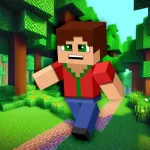
Minicraft
Minicraft is a top-down 2D action, crafting, and survival game built around a compact but demanding loop: explore the world, collect useful resources, make equipment, defend yourself from…
 Works on Desktop & Mobile
Tested By XoomGames
- Test date
- 2011
- Tested on
- Chrome 150
- Device
- Desktop
- Operating system
- macOS and Windows
- Game loaded successfully
- Yes
- Fullscreen works
- Yes
- Sound works
- Yes
- Save progress
- Local browser storage
- Mobile compatibility
- Partially tested
- Keyboard controls
- Working
- Controller support
- Not detected
- Average loading time
- 4.2 seconds
- Known issues
- Minor delay after entering fullscreen
Minicraft not loading?
- Refresh the page.
- Disable restrictive content blockers temporarily.
- Confirm JavaScript and WebGL are enabled.
- Clear the browser cache.
- Try another modern browser.
- Close unnecessary tabs.
- Switch off VPN if the game server is blocked.
- Use the Report a Problem button if the issue continues.
Related Games

Continue Playing
Daily Challenge

Play 7 minutes today in Minicraft.
Leaderboard
- 1Community rating4.4 ★
- 2Player likes428
- 3Total votes499
- 4Your local progress0%
Your progress is saved locally in this browser. No account required.
 Your progress is saved locally in this browser. No account required.
How to Play
Start by treating your first minutes as a scouting and preparation phase. Look around the nearby area, move with purpose, and collect materials that appear useful for early crafting. You do not need to solve every part of the world immediately. A strong opening is about establishing enough resources and space to make your next move safer.
- Survey the area. Learn where open routes, resource spots, and dangerous enemies are located before traveling too far from your starting area.
- Collect basic materials. Focus on resources that contribute to tools and survival rather than wandering without a goal.
- Use crafting as progression. Make equipment when it meaningfully improves gathering, combat, or your ability to explore.
- Choose your fights. Enemies are part of the challenge, but fighting every threat immediately can waste time and put collected resources at risk.
- Create a home base. Build a secure, recognizable place that supports your survival plan and gives your journeys a clear return point.
- Expand gradually. Once you have better tools and a safer routine, explore farther and take on more demanding areas.
A useful mindset is to ask one question before each trip: What am I trying to bring back? The answer may be a material, a new tool opportunity, or a safer route through the world. This simple goal keeps exploration efficient and helps prevent random wandering from draining your attention.
Minicraft rewards players who connect short actions into a longer plan. Gather enough to craft. Craft enough to reach more. Reach more while staying prepared to survive the return journey.
On mobile: use on-screen buttons or gestures when the game supports them.
 On mobile: use on-screen buttons or gestures when the game supports them.
Controls
- ↑Jump
- ← →Move Left / Right
- ↓Crouch
- W / ↑Climb / Interact
- S / ↓Drop / Slide
Because browser builds can present input prompts differently, check the game screen before relying on a specific key layout. The current version may show its control mapping when the game loads, in an opening screen, or through an in-game menu.
The important control roles to identify are:
- Movement: Used to travel through the top-down map and maintain distance from enemies.
- Action or attack: Used to gather from the environment, use tools, and defend yourself.
- Crafting or inventory access: Used to review resources and turn materials into useful equipment.
- Menu navigation: Used to make selections or return to play when a screen is open.
Take a brief moment to test movement in an open area before collecting valuable resources or approaching enemies. Once you know how the active browser build handles movement and actions, you can focus on timing, positioning, and resource planning instead of searching for controls under pressure.
Game Progress & Challenges
Why Play This Game?
 Instant PlayPlay instantly in your browser.
 Free to PlayNo hidden fees.
About "Minicraft"
Minicraft is a top-down 2D action, crafting, and survival game built around a compact but demanding loop: explore the world, collect useful resources, make equipment, defend yourself from enemies, and create a safer place to live. Its overhead viewpoint gives every trip a practical purpose. You are not simply wandering through scenery; you are looking for materials that can improve what you can make and how long you can survive.
The game is closely associated with Markus Persson and was created in 2011 as a fast game-development competition project. That origin helps explain its direct design. Minicraft focuses on the core pleasures of survival crafting without requiring a huge interface, a long tutorial, or a complicated world-management system. Each action feeds the next decision: what to collect, what to craft first, when to travel farther, and when to retreat.
Although its name can cause confusion with similarly named block-building games, Minicraft is best understood as a distinct overhead survival adventure rather than a full 3D voxel sandbox. The important experience is the resource-to-tool-to-exploration cycle. Players who enjoy learning a game through careful movement, steady upgrades, and small goals will find a clear challenge here.
Gameplay
Minicraft begins with the essentials of survival. Move through the top-down world, inspect the terrain around you, and gather the materials that can support your next task. Resources are not just collectibles. They are the foundation for tools, and tools open up more productive exploration. The stronger your preparation becomes, the more confidently you can travel, gather, and face danger.
The central gameplay loop has four connected parts:
- Explore: Search the surrounding world and identify useful areas, materials, threats, and routes back to safety.
- Gather: Collect resources deliberately instead of treating every item as equally valuable.
- Craft: Turn raw materials into practical tools that improve what you can do next.
- Survive: Fight enemies, protect your progress, and avoid turning a productive journey into a costly setback.
Combat matters because the world is not only a construction space. Enemies create pressure, particularly when you are carrying resources or moving through unfamiliar ground. A safe home therefore has real gameplay value: it gives your exploration a destination and encourages you to think about preparation rather than constant risk.
The top-down format also makes positioning important. You can see nearby obstacles, approach enemies with intent, and decide whether an area is worth entering before committing. This gives Minicraft a measured pace. It is accessible enough to start quickly, but it rewards players who notice patterns, conserve useful materials, and improve their capabilities one step at a time.
Platform
Minicraft is presented here as a browser game, so you can start a session from the game page instead of looking for a separate download or app-store listing. The browser format is especially useful for a focused survival run: open the game, learn the immediate situation, gather what you need, and continue building your progress at your own pace.
The game’s top-down design is naturally suited to a keyboard-led play style because movement, interaction, combat, and menu choices need quick input. Before beginning a serious run, look at the playable game screen for any control prompts supplied by the current build. This is the most reliable way to confirm the available inputs on your device.
For players browsing a wider selection, XoomGames also offers browser games that can be played directly online. Minicraft stands out within that format by pairing short-session convenience with a survival loop that can reward longer, more careful play.
How to Play "Minicraft"
Start by treating your first minutes as a scouting and preparation phase. Look around the nearby area, move with purpose, and collect materials that appear useful for early crafting. You do not need to solve every part of the world immediately. A strong opening is about establishing enough resources and space to make your next move safer.
- Survey the area. Learn where open routes, resource spots, and dangerous enemies are located before traveling too far from your starting area.
- Collect basic materials. Focus on resources that contribute to tools and survival rather than wandering without a goal.
- Use crafting as progression. Make equipment when it meaningfully improves gathering, combat, or your ability to explore.
- Choose your fights. Enemies are part of the challenge, but fighting every threat immediately can waste time and put collected resources at risk.
- Create a home base. Build a secure, recognizable place that supports your survival plan and gives your journeys a clear return point.
- Expand gradually. Once you have better tools and a safer routine, explore farther and take on more demanding areas.
A useful mindset is to ask one question before each trip: What am I trying to bring back? The answer may be a material, a new tool opportunity, or a safer route through the world. This simple goal keeps exploration efficient and helps prevent random wandering from draining your attention.
Minicraft rewards players who connect short actions into a longer plan. Gather enough to craft. Craft enough to reach more. Reach more while staying prepared to survive the return journey.
Controls
Because browser builds can present input prompts differently, check the game screen before relying on a specific key layout. The current version may show its control mapping when the game loads, in an opening screen, or through an in-game menu.
The important control roles to identify are:
- Movement: Used to travel through the top-down map and maintain distance from enemies.
- Action or attack: Used to gather from the environment, use tools, and defend yourself.
- Crafting or inventory access: Used to review resources and turn materials into useful equipment.
- Menu navigation: Used to make selections or return to play when a screen is open.
Take a brief moment to test movement in an open area before collecting valuable resources or approaching enemies. Once you know how the active browser build handles movement and actions, you can focus on timing, positioning, and resource planning instead of searching for controls under pressure.
Can "Minicraft" Unblocked?
Minicraft can be played unblocked from this XoomGames game page in a browser setting, giving players a direct way to access the top-down crafting and survival experience. There is no need to confuse this browser version with similarly named mobile listings, large 3D sandbox games, or unrelated block-building titles. This page is focused on the Minicraft experience of gathering, crafting, fighting, and building from an overhead view.
Browser play works well for both quick attempts and longer survival sessions. You can use a short break to learn the nearby map and collect materials, then return later with a clearer plan for crafting tools, exploring farther, and strengthening your home base.
If the game does not respond right away, first make sure the playable area has focus and review any on-screen instructions from the active build. Those prompts are the best source for version-specific controls and menu behavior. Once the game is running, the main objective is straightforward: make smart use of the world’s resources and keep your survival progress moving forward.
Tips for "Minicraft"
Prioritize useful resources over maximum resources. Early exploration can tempt you to collect everything in sight, but Minicraft is more manageable when you gather with a purpose. Think about what will help you craft a tool, improve survival, or support a safer return home. A smaller, intentional haul is often better than a long trip with no plan.
Make tools part of your route planning. Crafting is not a separate activity that happens after exploration; it shapes where you can go next. When you find materials, consider which piece of equipment will create the biggest improvement in gathering, combat, or mobility through the world. This keeps your progress focused.
Learn enemy spacing before committing to combat. The overhead perspective gives you valuable information. Watch where enemies are positioned, avoid getting trapped by terrain, and leave yourself room to retreat. Entering a fight on your terms is safer than reacting after danger has already surrounded you.
Build safety into every expedition. Before moving farther from your familiar area, decide where you can turn back and what resources are worth the risk. If you have collected important materials, returning to a secure area can be smarter than pressing onward for one more discovery.
Keep your home practical. A home is not only a visual achievement. It represents stability in a game where exploration and hostile encounters can interrupt progress. Make it easy to recognize, use it as the center of your plans, and let it guide the direction of future trips.
Set one objective at a time. Try goals such as gathering enough material for a specific tool, mapping a nearby route, improving your defense, or finding a better place to build. Clear objectives make Minicraft’s open-ended survival structure easier to read and more satisfying to master.
Features "Minicraft"
Minicraft combines several recognizable survival-game ideas in a concentrated top-down format. Its appeal comes from how those systems support one another rather than from unnecessary complexity.
- Top-down 2D world: An overhead viewpoint keeps nearby terrain, routes, and threats visible while you explore.
- Resource gathering: Search the environment for materials that support crafting and long-term survival.
- Tool crafting: Transform collected resources into equipment that can improve your options in the world.
- Enemy encounters: Defend yourself against hostile enemies instead of treating exploration as completely safe.
- Home building: Create a home that supports a more secure and organized survival routine.
- Player-driven progress: Choose whether your next priority is collecting, crafting, fighting, building, or scouting.
- Compact survival loop: The game centers on clear actions with lasting consequences: prepare well, travel farther, and use gains wisely.
The strongest feature is the connection between these systems. Gathering without crafting limits your growth. Crafting without exploration leaves potential resources undiscovered. Exploring without preparation makes enemies more dangerous. Building without a survival plan can leave you short of the tools needed to improve. Minicraft turns those dependencies into its main source of strategy.
It is also a useful choice for players who want a survival-crafting game without the visual and mechanical scale of a full 3D sandbox. The game keeps the focus on readable terrain, deliberate upgrades, and practical decision-making. That clarity makes it approachable for new players while leaving room for experienced players to refine routes, resource priorities, and risk management.
Best "Minicraft" Similar Games & Top Picks
- Burger Restaurant Simulator 3D: Play Burger Restaurant Simulator 3D unblocked on XoomGames. Cook burgers, serve customers, and manage your restaurant in your browser.
- Spiral Roll: Play Spiral Roll unblocked on XoomGames. Carve wood spirals, time your rolls, and clear obstacles in your browser.
- Papas Cluckeria: Play Papas Cluckeria, a chicken sandwich restaurant time-management game. Cook orders, serve customers, and improve your workflow.
- Carrom Clash: Play Carrom Clash online on desktop or mobile. Learn the controls, aiming basics, gameplay flow, and useful carrom board tips.
- Aqua Bits: Play Aqua Bits, an underwater survival arcade game. Collect floating bits, grow your fish, avoid predators, and climb the ocean food chain.
FAQ - Minicraft
What is Minicraft?
Minicraft is a top-down 2D action game with crafting, resource gathering, enemy combat, survival, and home-building elements. You explore a world, collect materials, make useful tools, fight threats, and build a safer place to support further adventures.
Is Minicraft the same as Minecraft?
No. The names are easy to confuse, and both games involve exploration and creation, but Minicraft is a distinct top-down 2D game. It is not presented as a full 3D voxel sandbox. Its gameplay centers on a more compact survival loop of gathering, crafting, fighting, and building.
Who made Minicraft?
Minicraft was designed and programmed by Markus Persson. It is associated with a 2011 game-development competition project, which helps explain its focused, direct design and emphasis on core survival-crafting ideas.
What do you do in Minicraft?
You roam the world to find resources, use those materials for crafting, make tools that improve your options, fight enemies, and build a home. The best way to progress is to connect those activities: gather with a goal, craft for a reason, and explore only as far as your preparation allows.
Can I play Minicraft in a browser?
Yes. This XoomGames page provides Minicraft as a browser game experience. Open the playable game area and follow the prompts available in the current build. Browser access makes it easy to begin a short session or spend more time developing your survival routine.
What are the Minicraft controls?
Check the game screen for the control prompts used by the active browser version. Different builds can display their input mapping differently. Identify movement, action or attack, crafting or inventory, and menu controls before beginning a difficult expedition, especially if you are using an unfamiliar device.
Is combat important in Minicraft?
Yes. Enemies are a key part of survival, so combat affects how confidently you can explore and how safely you can bring resources home. Use the top-down view to watch enemy positions, avoid poor approaches, and keep an open path for retreat when possible.
What is the best beginner strategy?
Begin by scouting the nearby area and collecting materials with a specific purpose. Craft practical tools before taking unnecessary risks, avoid treating every enemy as an immediate fight, and establish a recognizable home base. Then expand your exploration gradually as your equipment and confidence improve.
 Report a Problem
Comments About Minicraft