


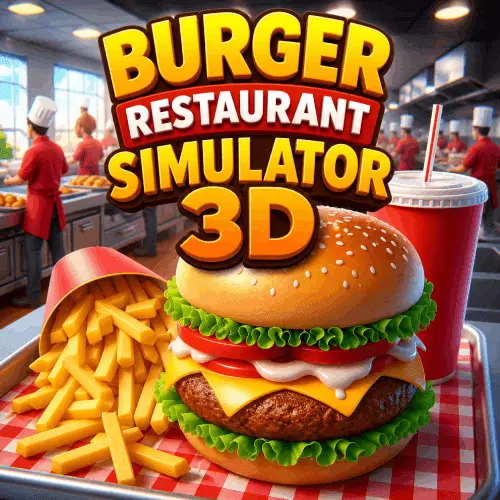
Burger Restaurant Simulator 3D
Burger Restaurant Simulator 3D is a casual restaurant management game centered on the fast pace of running a burger kitchen. You take charge of food preparation and customer…
 Works on Desktop & Mobile
Tested By XoomGames
- Test date
- August 24, 2026
- Tested on
- Chrome 150
- Device
- Desktop
- Operating system
- macOS and Windows
- Game loaded successfully
- Yes
- Fullscreen works
- Yes
- Sound works
- Yes
- Save progress
- Local browser storage
- Mobile compatibility
- Partially tested
- Keyboard controls
- Working
- Controller support
- Not detected
- Average loading time
- 4.2 seconds
- Known issues
- Minor delay after entering fullscreen
Burger Restaurant Simulator 3D not loading?
- Refresh the page.
- Disable restrictive content blockers temporarily.
- Confirm JavaScript and WebGL are enabled.
- Clear the browser cache.
- Try another modern browser.
- Close unnecessary tabs.
- Switch off VPN if the game server is blocked.
- Use the Report a Problem button if the issue continues.
Related Games





Continue Playing
Daily Challenge

Play 6 minutes today in Burger Restaurant Simulator 3D.
Leaderboard
- 1Community rating4.6 ★
- 2Player likes923
- 3Total votes1.0K
- 4Your local progress0%
Your progress is saved locally in this browser. No account required.
 Your progress is saved locally in this browser. No account required.
How to Play
- Launch the restaurant: Begin with the goal of operating a burger-focused fast-food business. Treat the kitchen and customer area as parts of the same workflow.
- Prepare the menu: Make the food items the restaurant is known for, including burgers and the supporting menu of fries, nuggets, drinks, and coffee. Keep the current order in mind while working through preparation.
- Handle burger cooking: Use the game’s cooking sequence to flip patties and move the burger order toward completion. Burgers are the central product, so this task should receive close attention.
- Serve customers: Deliver completed food as part of the restaurant-service process. Serving is not separate from management; it is how the kitchen’s work becomes progress for the business.
- Repeat the service loop: Return to food preparation after each service task. A reliable cook-and-serve rhythm helps you understand how menu work and customer demand fit together.
- Build toward expansion: The game frames your progress as a move from a small diner toward a larger food-truck empire. Keep the restaurant-growth goal in view as you continue cooking and managing.
A useful first-session mindset is to learn the food sequence before worrying about speed. Once burgers, sides, and drinks feel familiar, it becomes easier to respond to customers without losing track of the restaurant’s broader development.
On mobile: use on-screen buttons or gestures when the game supports them.
 On mobile: use on-screen buttons or gestures when the game supports them.
Controls
- ↑Jump
- ← →Move Left / Right
- ↓Crouch
- W / ↑Climb / Interact
- S / ↓Drop / Slide
Burger Restaurant Simulator 3D uses the interactive controls presented by the version running in your browser. Follow the on-screen prompts and interface cues to select cooking tasks, work with food items, and move through restaurant-management actions.
Because the gameplay is built around preparing food and serving customers, the most important control habit is deliberate interaction. Take a moment to identify the current task before acting, especially when switching between burger preparation, side items, drinks, and customer service.
- Use the visible game interface to begin cooking and management actions.
- Follow task prompts when preparing or serving food.
- Watch the current restaurant objective before moving to the next action.
- Use the game’s on-screen guidance if you are learning the order flow.
The exact input layout can depend on the version and device used, so the in-game interface is the best guide for each action.
Game Progress & Challenges
Why Play This Game?
 Instant PlayPlay instantly in your browser.
 Free to PlayNo hidden fees.
About "Burger Restaurant Simulator 3D"
Burger Restaurant Simulator 3D is a casual restaurant management game centered on the fast pace of running a burger kitchen. You take charge of food preparation and customer service, turning simple ingredients into orders that keep a growing restaurant moving. The main appeal is the combination of cooking tasks and business progress: prepare food, deliver it to customers, and keep building toward a larger burger operation.
Burgers are the core of the menu, but the restaurant experience also includes crispy fries, nuggets, drinks, and coffee. That wider menu gives the game more to manage than a single cooking step. Each order asks you to think like a quick-service restaurant operator, balancing preparation with the need to serve customers efficiently.
The game suits players who enjoy approachable food simulations, diner games, and light business-management play. Rather than requiring complicated restaurant expertise, it focuses on recognizable fast-food actions such as flipping patties, assembling food, and serving guests. Its restaurant-growth premise also gives each session a clear purpose beyond making one order at a time.
Gameplay
The central gameplay loop in Burger Restaurant Simulator 3D connects cooking, serving, and restaurant expansion. Start by handling the practical side of the kitchen: prepare burger items and work through the fast-food menu. Flipping patties is one of the explicit cooking activities, while fries, nuggets, drinks, and coffee broaden the set of products your restaurant can provide.
Once food is ready, customer service becomes the priority. Orders need to move from the kitchen to the people waiting for them, so the game naturally rewards attention to sequence and pace. A productive rhythm is to prepare what the restaurant needs, complete the current service task, then return to cooking before the next demand builds up. This makes the game feel like a restaurant simulator rather than a purely decorative cooking game.
Progress is tied to the idea of growing beyond a small diner. The game describes a path toward a larger food-truck-style empire, giving the restaurant-management theme a longer-term direction. That framing matters because it joins the immediate satisfaction of preparing food with the bigger goal of operating an expanding fast-food business.
Players looking for an idle-business angle will also recognize the management focus: the restaurant is not only a kitchen, but an operation to develop. The best way to approach play is to stay focused on the core cycle of cook, serve, manage, and grow. It is an accessible loop, but one with enough moving menu items to make efficient decisions feel useful.
Platform
Burger Restaurant Simulator 3D is available to play in a browser on XoomGames, making it a convenient option when you want a restaurant game without a separate installation step. Open the game page, launch it, and focus on running the kitchen from your browser.
The game is also associated with mobile and PC availability in the provided game listings, but browser access is the most relevant choice for players visiting this page. A browser session is useful for quick casual play as well as longer attempts at building a more successful burger restaurant.
If you enjoy quick-access cooking and management titles, explore more browser games on XoomGames. Browser play keeps the focus on the order flow, the food preparation, and the restaurant-building objective rather than download setup.
How to Play "Burger Restaurant Simulator 3D"
- Launch the restaurant: Begin with the goal of operating a burger-focused fast-food business. Treat the kitchen and customer area as parts of the same workflow.
- Prepare the menu: Make the food items the restaurant is known for, including burgers and the supporting menu of fries, nuggets, drinks, and coffee. Keep the current order in mind while working through preparation.
- Handle burger cooking: Use the game’s cooking sequence to flip patties and move the burger order toward completion. Burgers are the central product, so this task should receive close attention.
- Serve customers: Deliver completed food as part of the restaurant-service process. Serving is not separate from management; it is how the kitchen’s work becomes progress for the business.
- Repeat the service loop: Return to food preparation after each service task. A reliable cook-and-serve rhythm helps you understand how menu work and customer demand fit together.
- Build toward expansion: The game frames your progress as a move from a small diner toward a larger food-truck empire. Keep the restaurant-growth goal in view as you continue cooking and managing.
A useful first-session mindset is to learn the food sequence before worrying about speed. Once burgers, sides, and drinks feel familiar, it becomes easier to respond to customers without losing track of the restaurant’s broader development.
Controls
Burger Restaurant Simulator 3D uses the interactive controls presented by the version running in your browser. Follow the on-screen prompts and interface cues to select cooking tasks, work with food items, and move through restaurant-management actions.
Because the gameplay is built around preparing food and serving customers, the most important control habit is deliberate interaction. Take a moment to identify the current task before acting, especially when switching between burger preparation, side items, drinks, and customer service.
- Use the visible game interface to begin cooking and management actions.
- Follow task prompts when preparing or serving food.
- Watch the current restaurant objective before moving to the next action.
- Use the game’s on-screen guidance if you are learning the order flow.
The exact input layout can depend on the version and device used, so the in-game interface is the best guide for each action.
Can "Burger Restaurant Simulator 3D" Unblocked?
On XoomGames, Burger Restaurant Simulator 3D is presented for browser play, so you can jump into its burger cooking and restaurant-management loop from the game page. This is useful for players searching for an unblocked restaurant game they can access without treating it like a long setup project.
Browser access is especially suited to casual sessions: open the page, start the game, and concentrate on preparing food for customers. Whether you want to flip patties, handle fries and drinks, or work toward restaurant growth, the game keeps its main fast-food simulation goal easy to reach.
Availability can still depend on your local network, browser settings, or device environment. If a page does not load as expected, check those conditions and return to the game page. The gameplay itself remains focused on cooking, serving, and managing a burger business.
Tips for "Burger Restaurant Simulator 3D"
Learn the menu as a connected system. Burgers may be the restaurant’s centerpiece, but fries, nuggets, drinks, and coffee are also part of the available food-service context. Do not think of them as unrelated extras. They represent the kind of varied order handling that makes a fast-food restaurant feel active.
Prioritize the current service flow. The core actions are cooking and serving, so avoid treating either one as optional. A prepared item only contributes to the restaurant when the service side is handled too. Keep your attention on what must be made now and what must be delivered next.
Make burger preparation a dependable habit. Flipping patties is a specifically identified part of the game, and burgers define the restaurant theme. When learning, focus first on completing this central cooking task cleanly. Once that feels familiar, the supporting menu becomes easier to manage around it.
Use repetition to improve pace. Restaurant games reward recognition. Each time you work through a cook-and-serve cycle, notice how preparation, order completion, and customer service connect. Building a consistent routine is more valuable than rushing through unfamiliar actions.
Play with growth in mind. The game’s progression is framed as moving from a small diner toward a food-truck empire. That makes it helpful to view each customer interaction as part of a larger restaurant-building effort, not merely a one-off food task.
Read on-screen prompts carefully. The browser version’s interface provides the immediate guidance for the actions available in your session. When in doubt, use those prompts to confirm the next kitchen or service step rather than guessing.
Features "Burger Restaurant Simulator 3D"
- Burger restaurant simulation: Run a fast-food kitchen where cooking and customer service work together.
- Hands-on burger cooking: Flip patties as part of preparing the restaurant’s signature food.
- Expanded fast-food menu: Work with burgers alongside fries, nuggets, refreshing drinks, and coffee.
- Customer-serving gameplay: Prepare food and serve the people visiting your restaurant.
- Restaurant management focus: Balance kitchen activity with the broader task of operating a food business.
- Growth-driven premise: Progress from a small diner toward the idea of a larger food-truck empire.
- Casual business-game appeal: Combines simple food preparation with an accessible restaurant-development theme.
- Browser-friendly access: Play from the XoomGames game page and focus directly on the restaurant action.
What gives Burger Restaurant Simulator 3D its identity is the way familiar fast-food items support a broader business goal. Cooking a burger, preparing a side, or serving a drink all fit into the same restaurant workflow. The game is therefore a natural pick for players who want food-making tasks with a management purpose.
The restaurant-growth idea adds context to the cooking. Instead of presenting food preparation as an isolated activity, the game positions it within a diner-to-empire journey. That balance of direct kitchen work and larger operational ambition is the strongest reason to try it.
Best "Burger Restaurant Simulator 3D" Similar Games & Top Picks
- Spiral Roll: Play Spiral Roll unblocked on XoomGames. Carve wood spirals, time your rolls, and clear obstacles in your browser.
- Minicraft: Play Minicraft unblocked on XoomGames. Gather resources, craft useful tools, battle enemies, and build a safe home in your browser.
- Papas Cluckeria: Play Papas Cluckeria, a chicken sandwich restaurant time-management game. Cook orders, serve customers, and improve your workflow.
- Carrom Clash: Play Carrom Clash online on desktop or mobile. Learn the controls, aiming basics, gameplay flow, and useful carrom board tips.
- Aqua Bits: Play Aqua Bits, an underwater survival arcade game. Collect floating bits, grow your fish, avoid predators, and climb the ocean food chain.
FAQ - Burger Restaurant Simulator 3D
What is Burger Restaurant Simulator 3D?
Burger Restaurant Simulator 3D is a casual fast-food restaurant simulation game. You run a burger-focused kitchen, prepare food, serve customers, and work toward growing the restaurant operation. Its gameplay combines cooking tasks with the management theme of building a larger food business.
What food can you make in the game?
The game features a menu built around burgers. It also includes fries, nuggets, drinks, and coffee. This variety gives the restaurant a broader fast-food feel and means the gameplay is not limited to preparing one type of item.
Do you cook burgers in Burger Restaurant Simulator 3D?
Yes. Flipping patties is specifically part of the game’s burger-cooking activity. Burgers are the central menu item, while the other foods and drinks support the wider restaurant-service experience.
Is Burger Restaurant Simulator 3D a restaurant management game?
Yes. The game is about more than cooking individual items. You also serve customers and manage a burger restaurant with the aim of expanding from a small diner toward a larger food-truck empire. This gives the game both immediate food-preparation tasks and a longer-term business objective.
Can I play Burger Restaurant Simulator 3D in a browser?
Yes. The XoomGames version is available from this game page for browser play. That lets you access the restaurant gameplay directly and focus on cooking, serving, and managing without needing to describe the game as a separate install-first experience.
Is Burger Restaurant Simulator 3D free to play?
The game is described as a free idle game in the provided game research, and it is available to launch on XoomGames. Open the browser game page to start playing and experience its restaurant cooking and management loop.
What is the goal of the game?
The goal is to operate a successful burger restaurant by preparing food and serving customers. The game’s growth premise begins with a small diner and points toward building a food-truck-style empire, so your work in the kitchen supports a larger restaurant-development journey.
Are the controls difficult to learn?
The game is designed around recognizable restaurant actions and uses the on-screen interface to guide play. Follow the visible prompts for cooking, food handling, and service actions. As you repeat the burger preparation and customer-serving loop, the order flow becomes easier to understand.
 Report a Problem
Comments About Burger Restaurant Simulator 3D