


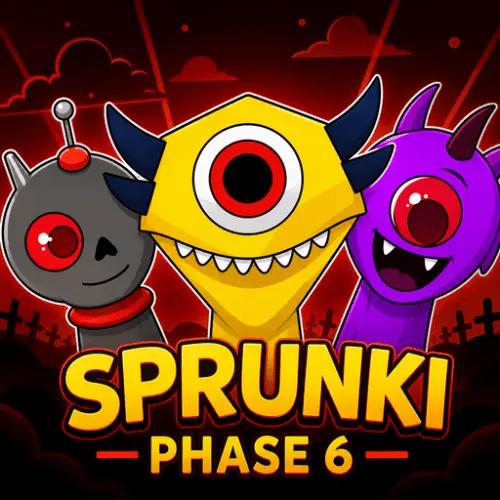
Sprunki Phase 6
Sprunki Phase 6 is a character-based music game built around mixing sounds into your own eerie rhythm. It is part of the independently modded Sprunki Scratch project, where…
 Works on Desktop & Mobile
Tested By XoomGames
- Test date
- August 22, 2026
- Tested on
- Chrome 150
- Device
- Desktop
- Operating system
- macOS and Windows
- Game loaded successfully
- Yes
- Fullscreen works
- Yes
- Sound works
- Yes
- Save progress
- Local browser storage
- Mobile compatibility
- Partially tested
- Keyboard controls
- Working
- Controller support
- Not detected
- Average loading time
- 4.2 seconds
- Known issues
- Minor delay after entering fullscreen
Sprunki Phase 6 not loading?
- Refresh the page.
- Disable restrictive content blockers temporarily.
- Confirm JavaScript and WebGL are enabled.
- Clear the browser cache.
- Try another modern browser.
- Close unnecessary tabs.
- Switch off VPN if the game server is blocked.
- Use the Report a Problem button if the issue continues.
Related Games
Continue Playing
Daily Challenge

Play 7 minutes today in Sprunki Phase 6.
Leaderboard
- 1Community rating4.6 ★
- 2Player likes636
- 3Total votes701
- 4Your local progress0%
Your progress is saved locally in this browser. No account required.
 Your progress is saved locally in this browser. No account required.
How to Play
Start Sprunki Phase 6 with the idea that you are assembling a sound scene. The characters are not just decoration: Phase 6 changes its character set, sound palette, animations, and rhythms, so each available choice contributes to the identity of the mix.
Begin by activating or adding a single available character sound through the game’s on-screen interface. Listen carefully before adding more. Ask what role that first part seems to play: does it establish a beat, create an eerie texture, or bring a stronger melodic or vocal-like presence? Once you have a base, add another sound that either reinforces the rhythm or deliberately changes the mood.
- Choose a starting sound. Give the first layer space so you can recognize its rhythm and tone.
- Add a supporting layer. Look for a sound that makes the first one feel more complete instead of immediately making the mix busy.
- Test contrast. Try a different character sound to see whether a sharper, darker, or more animated part improves the arrangement.
- Listen to the full loop. Avoid changing parts too quickly; a combination may make more sense after its rhythm repeats.
- Refine the blend. Remove or replace layers that distract from the mood you want.
- Experiment again. A sound that fails in one mix may become effective when paired with a different base.
The strongest mixes usually have a recognizable foundation. Start simple, then make intentional changes. If everything is added at once, it becomes harder to tell which character or sound is creating the effect you like. Working layer by layer also helps you learn the Phase 6 palette faster.
There is no need to force the music into a conventional style. The game is described as spooky and charming, so unusual combinations are part of its appeal. A tense rhythm, odd sound contrast, or animated character pairing may be exactly what gives your track personality.
On mobile: use on-screen buttons or gestures when the game supports them.
 On mobile: use on-screen buttons or gestures when the game supports them.
Controls
- ↑Jump
- ← →Move Left / Right
- ↓Crouch
- W / ↑Climb / Interact
- S / ↓Drop / Slide
Sprunki Phase 6 uses its on-screen music interface to let players build and change a mix. The key action is interacting with the available character and sound options, then listening to the result as each part becomes part of the arrangement.
The provided research confirms the music-mixing concept but does not document an official keyboard layout or a complete button-by-button control guide. For that reason, the most reliable control advice is to follow the prompts and interaction cues visible in the current browser build rather than relying on an assumed key binding.
| Action | What to do |
|---|---|
| Choose sounds | Use the on-screen options |
| Build a mix | Add character sound layers |
| Refine rhythm | Change one layer at a time |
| Hear details | Keep audio enabled |
If an interaction does not produce the sound you expected, slow down and test one available option at a time. This makes it easier to connect a character’s visual identity with its musical contribution.
Game Progress & Challenges
Why Play This Game?
 Instant PlayPlay instantly in your browser.
 Free to PlayNo hidden fees.
About "Sprunki Phase 6"
Sprunki Phase 6 is a character-based music game built around mixing sounds into your own eerie rhythm. It is part of the independently modded Sprunki Scratch project, where each phase changes the cast, audio, animation style, and musical feel. Phase 6 leans into a spooky but playful atmosphere: the characters are central to both the visual presentation and the sound of every mix.
Rather than asking you to memorize notes or perform a song perfectly, the game focuses on experimenting with combinations. Bring different sounds together, listen for how they overlap, and shape a track that feels balanced, strange, energetic, or dark. The appeal is the direct connection between what you add visually and what you hear musically.
This is a good choice for players who enjoy interactive music toys, remix-style games, and browser experiences with a horror-tinged mood. Every new sound choice can alter the groove, so there is room to revisit a mix and try a different direction. If you enjoy quick creative sessions, browse more browser games when you are ready for another play-anytime challenge.
Phase 6 is best approached as a musical playground. There is no need to chase one “correct” composition; the reward comes from noticing how the characters, rhythms, and animations work together.
Gameplay
The core gameplay in Sprunki Phase 6 is sound mixing. Characters represent parts of the musical arrangement, and the goal is to combine those parts into a rhythm that you enjoy. As sounds join the mix, the overall result can become fuller, more rhythmic, more melodic, or more unsettling depending on the combinations you choose.
The game’s Phase 6 identity comes from its distinct set of characters, sounds, animations, and rhythms. That means the experience is not simply about playing a sequence once. It is about testing how this phase’s particular audio palette behaves when layered. A character may contribute a pulse, vocal-like texture, effect, or other musical color, while its animation helps make the mix feel active on screen.
A useful way to play is to build in stages:
- Start with one sound and listen to its tempo and mood.
- Add another part that supports the first rather than competing with it.
- Introduce a contrasting sound to give the track more character.
- Pause and assess whether the mix feels clear or overcrowded.
- Swap one element at a time to discover stronger pairings.
This gradual approach turns a simple music game into a small arranging exercise. You are not only collecting sounds; you are deciding which layers deserve attention. The spooky presentation makes experimentation especially satisfying, because an unexpected combination can change both the atmosphere and the perceived energy of the track.
Players looking for a fast session can make a compact beat with only a few sounds. Players who prefer discovery can spend longer comparing combinations and listening for a mix that has a memorable rhythm. Both styles fit the game because the main activity is creative listening, not score chasing.
Platform
Sprunki Phase 6 is associated with HTML5 and Windows releases, while this XoomGames page is designed for browser play. HTML5 is useful for a music-focused game because it supports an immediate play flow: open the game, interact with the available characters and sounds, and begin building a mix without treating it like a large installation.
For the clearest audio experience, play with your device sound enabled or use headphones. The game’s main value is in hearing how rhythms and sound layers combine, so muted playback can hide much of the intended interaction.
The available research does not confirm a separate mobile control layout, offline mode, account system, save system, or downloadable build through this page. Browser availability is the practical focus here. If the game window offers full-screen support, using it can also make the character animations and active mix easier to follow.
Because music games rely on timing and audio clarity, a stable browser session is more important than high-end hardware. Let the sounds play long enough to hear how a combination settles before making a final judgment about it.
How to Play "Sprunki Phase 6"
Start Sprunki Phase 6 with the idea that you are assembling a sound scene. The characters are not just decoration: Phase 6 changes its character set, sound palette, animations, and rhythms, so each available choice contributes to the identity of the mix.
Begin by activating or adding a single available character sound through the game’s on-screen interface. Listen carefully before adding more. Ask what role that first part seems to play: does it establish a beat, create an eerie texture, or bring a stronger melodic or vocal-like presence? Once you have a base, add another sound that either reinforces the rhythm or deliberately changes the mood.
- Choose a starting sound. Give the first layer space so you can recognize its rhythm and tone.
- Add a supporting layer. Look for a sound that makes the first one feel more complete instead of immediately making the mix busy.
- Test contrast. Try a different character sound to see whether a sharper, darker, or more animated part improves the arrangement.
- Listen to the full loop. Avoid changing parts too quickly; a combination may make more sense after its rhythm repeats.
- Refine the blend. Remove or replace layers that distract from the mood you want.
- Experiment again. A sound that fails in one mix may become effective when paired with a different base.
The strongest mixes usually have a recognizable foundation. Start simple, then make intentional changes. If everything is added at once, it becomes harder to tell which character or sound is creating the effect you like. Working layer by layer also helps you learn the Phase 6 palette faster.
There is no need to force the music into a conventional style. The game is described as spooky and charming, so unusual combinations are part of its appeal. A tense rhythm, odd sound contrast, or animated character pairing may be exactly what gives your track personality.
Controls
Sprunki Phase 6 uses its on-screen music interface to let players build and change a mix. The key action is interacting with the available character and sound options, then listening to the result as each part becomes part of the arrangement.
The provided research confirms the music-mixing concept but does not document an official keyboard layout or a complete button-by-button control guide. For that reason, the most reliable control advice is to follow the prompts and interaction cues visible in the current browser build rather than relying on an assumed key binding.
| Action | What to do |
|---|---|
| Choose sounds | Use the on-screen options |
| Build a mix | Add character sound layers |
| Refine rhythm | Change one layer at a time |
| Hear details | Keep audio enabled |
If an interaction does not produce the sound you expected, slow down and test one available option at a time. This makes it easier to connect a character’s visual identity with its musical contribution.
Can "Sprunki Phase 6" Unblocked?
Sprunki Phase 6 unblocked play means accessing the game in a browser without needing a traditional download flow for the session. On XoomGames, the focus is straightforward browser access so you can get to the music mixing, character animations, and eerie rhythm-building without searching for a separate installation.
For the best chance of a smooth session, use an up-to-date browser, allow the game page to finish loading, and make sure audio is not muted. Since this is a sound-driven experience, browser sound permissions and device volume matter more than they might in a purely visual arcade game.
Availability can still depend on local network, browser, school, workplace, or device restrictions. If a network blocks game pages, that is a setting controlled by that network rather than by the game itself. This page does not require you to invent a workaround: simply use permitted access and enjoy the browser version where it is available.
Once the game is running, the most useful preparation is a quiet moment to listen. The details of the Phase 6 rhythm and sound combinations are easier to appreciate when the audio has your attention.
Tips for "Sprunki Phase 6"
Build a foundation before chasing complexity. Start with a sound that gives the mix a clear pulse or mood. When the first layer is easy to recognize, every later decision becomes more deliberate. A strong base helps the spooky Phase 6 atmosphere feel intentional rather than random.
Make one change per test. If you add several sounds at once, you may hear that the mix changed without knowing why. Add, remove, or replace one character sound, then listen through the rhythm again. This is the fastest way to learn which combinations work well together.
Use contrast carefully. A mix can benefit from sounds that feel different from one another, but too much contrast can blur the rhythm. Pair a steady layer with a more unusual texture, then decide whether the contrast adds tension or simply distracts from the beat.
Let animations guide your attention. Sprunki Phase 6 changes both sounds and animations. Watch which characters feel most active or expressive when their sounds are part of the track. The visual feedback can help you remember a combination that created a particularly effective mood.
Listen for empty space. Not every successful mix needs every possible layer. If the rhythm already feels complete, leaving room between ideas can make the remaining sounds easier to notice. Removing one crowded part may improve the track more than adding another.
Try mood-first mixing. Instead of asking, “What should I add next?” decide on a target feeling first. You might want an eerie loop, a lively rhythm, a strange character-heavy arrangement, or a darker soundscape. Once you have a mood in mind, choose layers that support it.
Revisit combinations. A sound pairing that seems weak at the beginning may become effective after you change the foundation beneath it. Creative music games reward repeated testing because the relationship between parts matters more than any single sound in isolation.
Use headphones when possible. Headphones can make it easier to notice small rhythmic details and overlapping textures. That extra clarity is valuable when deciding whether a new character sound strengthens the mix or makes it too dense.
Features "Sprunki Phase 6"
Character-led music creation. The game connects its sound mixing to a cast of characters, making the music feel visual as well as audible. Each phase changes the characters, so Phase 6 has its own recognizable presentation.
Distinct Phase 6 sound palette. Sounds, rhythms, and animations are all part of what changes from one Sprunki phase to another. This gives Phase 6 a separate musical identity rather than making it feel like a generic beat maker.
Spooky, charming atmosphere. The game is presented as a horror-tagged and eerie musical experience, but its character-focused format also gives it a playful charm. That blend supports experimental mixes that can be creepy, quirky, or rhythmically energetic.
Interactive mixing instead of passive listening. You influence the result by combining available sounds. The main satisfaction comes from hearing how the arrangement changes when a new part joins, replaces, or contrasts with the existing rhythm.
Animations tied to the musical experience. Visual animation is not separate from the game’s identity. As you work with the character-based sound set, the animated presentation helps the mix feel alive and gives you another way to follow the active elements.
Easy short-session format. You can approach the game as a quick creative break: make a small beat, test a few character combinations, and move on. There is also enough room for longer experimentation if you want to refine a particular sound blend.
Browser-focused access. HTML5 is associated with the game, and XoomGames provides a convenient browser setting for starting a music session. The experience is centered on immediate interaction rather than lengthy setup.
No single required musical answer. The game rewards listening and experimentation. Different players may prefer different sound pairings, and the same set of characters can support several moods depending on how the layers are combined.
Best "Sprunki Phase 6" Similar Games & Top Picks
- sprunki phase 9: A quick browser game pick from the same collection.
- sprunki 5: Play sprunki 5 unblocked on XoomGames. Mix character sounds and build eerie music tracks in your browser.
- Dancing Beat: Play Dancing Beat unblocked on XoomGames. Guide the moving ball through music-driven mazes with well-timed clicks or taps.
- Sprunki Adventure 3: Play Sprunki Adventure 3 online. Explore colorful locations, complete quests, find 15 hidden keys, solve puzzles, and unlock the treasure chest.
- Murder: A quick browser game pick from the same collection.
FAQ - Sprunki Phase 6
What is Sprunki Phase 6?
Sprunki Phase 6 is a character-based interactive music game in the Sprunki modded project. Its Phase 6 version changes the characters, sounds, animations, and rhythms used to create mixes. Players combine available sound elements to make their own eerie or energetic musical arrangements.
Is Sprunki Phase 6 a music game?
Yes. The central activity is mixing sounds and crafting beats. Rather than focusing on score-based music performance, it lets you experiment with how character-linked sounds work together in a shared rhythm.
What makes Phase 6 different from other Sprunki phases?
The defining idea of the phases is that each one changes the character set, sound selection, animations, and rhythms. Phase 6 therefore has its own audio and visual identity. The best way to understand that identity is to test its combinations and listen for the mood they create.
Can I play Sprunki Phase 6 in a browser?
Yes, this XoomGames page is intended for browser play. The game is also associated with HTML5, which fits its quick, interactive music-game format. Use a modern browser and keep your sound enabled to get the full experience.
Is Sprunki Phase 6 free to play?
You can access Sprunki Phase 6 on XoomGames as an online browser game. The practical goal is to let players begin mixing sounds through the game page without treating the session like a conventional downloaded game installation.
How do you make a good mix in Sprunki Phase 6?
Start with one sound, then add layers gradually. Listen for a stable rhythm or mood before introducing a contrasting part. Change one element at a time so you can tell whether it improves the mix. If the result becomes crowded, remove a layer and let the remaining sounds stand out.
Does Sprunki Phase 6 have horror elements?
It has a spooky and eerie presentation, and it is associated with horror tagging. The tone is better understood as creepy-but-playful musical experimentation than as a description of a traditional action horror game. Its characters, sounds, and animations create much of that atmosphere.
What are the controls for Sprunki Phase 6?
The confirmed gameplay is based on the game’s on-screen music interface and available character sound options. The supplied information does not verify a universal keyboard control list, so follow the interaction prompts in the version currently loaded. Focus on selecting sound elements, listening to the result, and adjusting the mix one layer at a time.
More Games Like This
 sprunki phase 9
Music Games ★ 4.4
sprunki phase 9
Music Games ★ 4.4
 sprunki 5
Music Games ★ 4.7
sprunki 5
Music Games ★ 4.7
 Dancing Beat
Music Games ★ 4.7
Dancing Beat
Music Games ★ 4.7
 Sprunki Adventure 3
Music Games ★ 4.6
Sprunki Adventure 3
Music Games ★ 4.6
 Murder
Music Games ★ 4.7
Murder
Music Games ★ 4.7
 Cheat or Repeat
Music Games ★ 4.7
Cheat or Repeat
Music Games ★ 4.7
 Flip Diving
Music Games ★ 4.6
Flip Diving
Music Games ★ 4.6
 Penalty Kick Online
Music Games ★ 4.6
Penalty Kick Online
Music Games ★ 4.6
 Moto Road Rash 3D
Music Games ★ 4.5
Moto Road Rash 3D
Music Games ★ 4.5
 Cut the Rope
Music Games ★ 4.7
Cut the Rope
Music Games ★ 4.7
 Enclose Horse
Music Games ★ 4.7
Enclose Horse
Music Games ★ 4.7
 Splix IO
Music Games ★ 4.7
Splix IO
Music Games ★ 4.7
 FoodStars.io
Music Games ★ 4.5
FoodStars.io
Music Games ★ 4.5
 Red Ball 3
Music Games ★ 4.7
Red Ball 3
Music Games ★ 4.7
 Slope 3
Music Games ★ 4.7
Slope 3
Music Games ★ 4.7
 G-Switch 3
Music Games ★ 4.7
G-Switch 3
Music Games ★ 4.7
 Flappy Dunk
Music Games ★ 4.6
Flappy Dunk
Music Games ★ 4.6
 Word Wipe
Music Games ★ 4.7
Word Wipe
Music Games ★ 4.7
 Report a Problem
Comments About Sprunki Phase 6