


Word Wipe
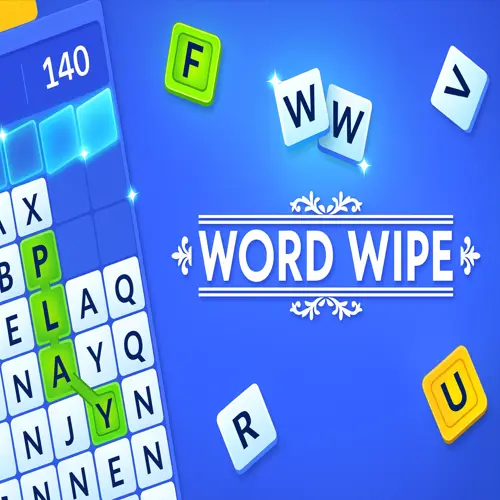
Word Wipe is a timed word-search puzzle game built around quick recognition, vocabulary, and smart board clearing. Instead of finding a single hidden word, you connect neighboring letter…
 Works on Desktop & Mobile
Tested By XoomGames
- Test date
- August 25, 2026
- Tested on
- Chrome 150
- Device
- Desktop
- Operating system
- macOS and Windows
- Game loaded successfully
- Yes
- Fullscreen works
- Yes
- Sound works
- Yes
- Save progress
- Local browser storage
- Mobile compatibility
- Partially tested
- Keyboard controls
- Working
- Controller support
- Not detected
- Average loading time
- 4.2 seconds
- Known issues
- Minor delay after entering fullscreen
Word Wipe not loading?
- Refresh the page.
- Disable restrictive content blockers temporarily.
- Confirm JavaScript and WebGL are enabled.
- Clear the browser cache.
- Try another modern browser.
- Close unnecessary tabs.
- Switch off VPN if the game server is blocked.
- Use the Report a Problem button if the issue continues.
Related Games
Continue Playing
Daily Challenge

Play 7 minutes today in Word Wipe.
Leaderboard
- 1Community rating4.7 ★
- 2Player likes722
- 3Total votes788
- 4Your local progress0%
Your progress is saved locally in this browser. No account required.
 Your progress is saved locally in this browser. No account required.
How to Play
- Study the letter grid. Start by scanning for familiar word beginnings, common letter combinations, and easy three- or four-letter words.
- Connect adjacent letters. Select a path through neighboring tiles to form a word. The important rule is adjacency: each letter in your path must touch the next one on the board.
- Submit the word. Finish the selection to make the word. Accepted words clear their matching tiles from the grid.
- Use cleared space wisely. Watch how removing tiles affects the board. Open areas and incomplete rows can become useful targets for your next move.
- Clear rows whenever possible. The goal is not only to make words but also to clear as many rows as you can within the time limit. Prioritize words that help remove letters from crowded or nearly clear rows.
- Keep moving against the clock. Do not spend too long forcing one difficult word. If you see a valid, helpful word, make it and reassess the new layout.
A strong round usually alternates between quick, dependable words and larger clears. Early in the game, establish momentum by removing obvious connections. As the board changes, look for words that solve two problems at once: they score points and reduce the letters blocking a row. The timer makes hesitation costly, so a practical word now is often better than a perfect word found too late.
On mobile: use on-screen buttons or gestures when the game supports them.
 On mobile: use on-screen buttons or gestures when the game supports them.
Controls
- ↑Jump
- ← →Move Left / Right
- ↓Crouch
- W / ↑Climb / Interact
- S / ↓Drop / Slide
Word Wipe uses straightforward pointer controls designed for selecting connected letter tiles. The key is to trace your word in the correct order without breaking the path.
| Action | Control |
|---|---|
| Start a word | Press or click a letter |
| Build a word | Drag across adjacent letters |
| Submit a word | Release after tracing |
| Find the next move | Scan the updated grid |
Move deliberately rather than rushing the pointer across the board. A clean path helps you confirm that every selected letter is adjacent and that the spelling matches the word you intended. After submitting a word, immediately look at the altered grid instead of searching from the same area again.
Game Progress & Challenges
Why Play This Game?
 Instant PlayPlay instantly in your browser.
 Free to PlayNo hidden fees.
About "Word Wipe"
Word Wipe is a timed word-search puzzle game built around quick recognition, vocabulary, and smart board clearing. Instead of finding a single hidden word, you connect neighboring letter tiles to create as many valid words as possible before the clock expires. Every word removes its letters from the grid, helping you open space and work toward clearing rows.
The central challenge is simple to understand but demanding in play: spot connected letter patterns, make a word, then immediately scan the changing board for the next opportunity. Short words can keep your momentum moving, while longer words can remove more tiles at once. The best choice depends on the letters available, the time remaining, and whether a move will help clear a crowded row.
Word Wipe combines the familiar appeal of a word game with the urgency of an arcade-style timer. It rewards players who can shift between reading the board broadly and tracing a precise path through adjacent letters. Whether you want a quick vocabulary challenge or a focused score chase, this puzzle gives every second and every connection a purpose.
Gameplay
In Word Wipe, the board is filled with letter tiles. Your job is to drag through adjacent letters to spell words, then release to submit the selection. When the game accepts a word, those tiles are cleared from the board. New letter arrangements create fresh possibilities, so each successful move changes what you can make next.
The round is governed by a time limit. You need to keep producing words while also trying to clear as many rows as possible. This creates two connected goals: build your score through word-making and manage the grid so it does not become difficult to use. A word that removes letters from a nearly completed row can be more useful than an isolated word elsewhere on the board.
Word length matters because longer connected words usually clear more tiles in one move. However, constantly hunting for a large word can cost valuable time. Effective play is about choosing the best available option quickly: take an obvious short word when it opens the board, then look for longer paths when the letter layout supports them.
The pace can increase as you continue, making fast visual scanning increasingly important. Rather than reading every letter in order, look for common beginnings, endings, and letter pairs. Once you identify a likely word, trace it cleanly through neighboring tiles and move on. Word Wipe is less about waiting for a perfect board and more about making useful decisions before the timer does.
Platform
Word Wipe is available to play online through XoomGames in your web browser. The game format suits short sessions because the action begins on a letter grid and each round centers on making words before time runs out.
A browser word puzzle is especially convenient when you want a quick mental break without setting up a long campaign or learning a complicated control scheme. Open the game page, begin a round, and focus on the board, timer, and available letter paths.
Because Word Wipe is a score-focused puzzle game, it also works well for repeat play. A new board can present different word opportunities, while the same core skills remain useful: recognizing adjacent letters, forming valid words, clearing tiles, and maintaining speed. Explore more browser games when you want another instant-play challenge.
How to Play "Word Wipe"
- Study the letter grid. Start by scanning for familiar word beginnings, common letter combinations, and easy three- or four-letter words.
- Connect adjacent letters. Select a path through neighboring tiles to form a word. The important rule is adjacency: each letter in your path must touch the next one on the board.
- Submit the word. Finish the selection to make the word. Accepted words clear their matching tiles from the grid.
- Use cleared space wisely. Watch how removing tiles affects the board. Open areas and incomplete rows can become useful targets for your next move.
- Clear rows whenever possible. The goal is not only to make words but also to clear as many rows as you can within the time limit. Prioritize words that help remove letters from crowded or nearly clear rows.
- Keep moving against the clock. Do not spend too long forcing one difficult word. If you see a valid, helpful word, make it and reassess the new layout.
A strong round usually alternates between quick, dependable words and larger clears. Early in the game, establish momentum by removing obvious connections. As the board changes, look for words that solve two problems at once: they score points and reduce the letters blocking a row. The timer makes hesitation costly, so a practical word now is often better than a perfect word found too late.
Controls
Word Wipe uses straightforward pointer controls designed for selecting connected letter tiles. The key is to trace your word in the correct order without breaking the path.
| Action | Control |
|---|---|
| Start a word | Press or click a letter |
| Build a word | Drag across adjacent letters |
| Submit a word | Release after tracing |
| Find the next move | Scan the updated grid |
Move deliberately rather than rushing the pointer across the board. A clean path helps you confirm that every selected letter is adjacent and that the spelling matches the word you intended. After submitting a word, immediately look at the altered grid instead of searching from the same area again.
Can "Word Wipe" Unblocked?
Word Wipe can be played unblocked on XoomGames directly from the game page. It is an online word puzzle focused on connecting letters, clearing tiles, and racing the timer, making it a practical choice when you want a quick browser-based challenge.
The main appeal is immediate puzzle action: open the page, read the grid, and begin building words. There is no need to turn the game into a long session for it to be satisfying. A single round can test your vocabulary, attention, and ability to make fast choices under pressure.
For the smoothest experience, keep your attention on the active board and timer. The game rewards quick transitions between words, especially when one cleared group of tiles reveals a better route for the next word. Each round gives you another chance to improve your row-clearing approach and score-building rhythm.
Tips for "Word Wipe"
Start with visible words. Your first goal is momentum. If you immediately see a valid short word, make it rather than spending too long searching for a larger one. Clearing tiles early changes the board and may expose stronger combinations.
Think in letter patterns. Scan for common word shapes instead of trying to read every possible path one letter at a time. Familiar starts, endings, doubled letters, and common vowel-consonant patterns can help you identify playable words faster.
Balance length and speed. Long words remove more tiles, but they are not always the best move. When the timer is tight, several quick words can be more valuable than one difficult word that takes too long to trace. Take longer paths when they are clear and do not interrupt your pace.
Target crowded rows. Since clearing rows is a major objective, pay attention to where your word will remove tiles. A smaller word that helps finish a row may be strategically stronger than a longer word in an already open area.
Rescan after every clear. Do not stay locked into the word you hoped to make before the board changed. Removed letters create new adjacencies and can turn an ordinary area into a useful word path. Treat each accepted word as a reset for your search.
Use the whole board. Players often focus on the center because it is visually convenient. Check edges and corners too. A compact word near an edge can clear a troublesome tile and improve a row without requiring a long path.
Avoid perfection traps. If a potential word is uncertain or requires an awkward route, move on. Word Wipe rewards active board management. Reliable words, fast recognition, and frequent clears are more useful than waiting for one ideal solution.
Features "Word Wipe"
- Timed word-building gameplay: Form words before the round timer runs down.
- Adjacent-letter paths: Connect neighboring letter tiles in sequence to create words.
- Grid-clearing objective: Remove word tiles and work toward clearing as many rows as possible.
- Changing puzzle board: Each accepted word alters the available letter layout and creates new decisions.
- Score-focused challenge: Making more words and clearing more tiles supports stronger performance.
- Increasing pace: The game becomes more demanding as speed and quick recognition matter more.
- Vocabulary and pattern recognition: Success depends on seeing word fragments, useful letter pairs, and efficient paths.
- Quick browser sessions: The clear objective and immediate grid-based action make the game easy to return to for another round.
What makes Word Wipe engaging is the way its mechanics overlap. You are not simply searching for words, and you are not simply removing blocks. Every selection affects time, score potential, tile placement, and row-clearing progress. That overlap gives the game depth without adding complicated rules.
The most useful skill is adaptability. A board can look crowded one moment and open the next after a well-placed word. Players who react to those changes, rather than following a fixed search pattern, can make better use of the letters available. The result is a word puzzle that stays focused on one clear action: connect, clear, scan, and repeat.
Best "Word Wipe" Similar Games & Top Picks
- Cut the Rope: Play Cut the Rope unblocked on XoomGames. Cut ropes, collect stars, and guide candy to Om Nom in your browser.
- Enclose Horse: Play Enclose Horse unblocked on XoomGames. Place fences, guide the horse, and build a valuable meadow in your browser.
- Match Arena: Play Match Arena unblocked on XoomGames. Swap colorful tiles, chase goals, and challenge real players in browser match-three battles.
- Plactions: Play Plactions unblocked on XoomGames. Plan jumps, dashes, gravity flips, portals, and laser toggles to reach each exit in your browser.
- The Coffin of Andy and Leyley: Play The Coffin of Andy and Leyley unblocked on XoomGames. Explore, talk, solve light puzzles, and make difficult choices in your browser.
FAQ - Word Wipe
What is Word Wipe?
Word Wipe is a timed word puzzle game in which you connect adjacent letter tiles to form words. Accepted words clear their letters from the grid, and the overall aim is to clear as many rows as possible before time runs out.
How do you make words in Word Wipe?
Find letters that sit next to one another on the board and drag through them in the order needed to spell a word. The letters must form a connected adjacent path. When you release the selection, the game checks the word and clears the tiles if it is accepted.
What is the main goal in Word Wipe?
The goal is to create as many words as possible within the time limit while clearing rows from the board. Making words removes tiles, but the most useful moves also help reduce crowded rows and create more open space for future words.
Do longer words help in Word Wipe?
Longer words can be helpful because they clear more letters in a single move. Still, speed matters. A quick short word that clears an important tile or helps finish a row can be better than spending too much time searching for a long word.
Why should I clear rows instead of only making words?
Clearing rows is part of the game objective, so row-focused moves give your word-building a strategic purpose. Watch where a word will remove tiles. Choosing a word that improves a nearly cleared row can make the board easier to manage and support continued progress.
Does Word Wipe get faster?
The game becomes more demanding as you play, so rapid recognition becomes increasingly important. Keep scanning for clear word paths, make practical choices quickly, and avoid getting stuck on one difficult combination while the timer continues to run.
What is the best strategy for beginners?
Begin with obvious words to learn how adjacent paths work and to keep the board changing. Then start looking for words that clear useful areas rather than choosing only the longest word available. After every successful word, pause briefly to rescan the new layout for fresh connections.
Can I play Word Wipe online?
Yes. Word Wipe is available online on XoomGames. You can play through the game page in your browser and focus on building words, clearing letter tiles, and beating the timer.
More Games Like This
 Cut the Rope
Puzzle ★ 4.7
Cut the Rope
Puzzle ★ 4.7
 Enclose Horse
Puzzle ★ 4.7
Enclose Horse
Puzzle ★ 4.7
 Escape Room: Mystery Key
Puzzle ★ 4.7
Escape Room: Mystery Key
Puzzle ★ 4.7
 Match Arena
Puzzle ★ 4.5
Match Arena
Puzzle ★ 4.5
 Plactions
Puzzle ★ 4.6
Plactions
Puzzle ★ 4.6
 The Coffin of Andy and Leyley
Puzzle ★ 4.7
The Coffin of Andy and Leyley
Puzzle ★ 4.7
 The Idiot Test
Puzzle ★ 4.5
The Idiot Test
Puzzle ★ 4.5
 Escape Raid
Puzzle ★ 4.6
Escape Raid
Puzzle ★ 4.6
 Pink
Puzzle ★ 4.7
Pink
Puzzle ★ 4.7
 Blumgi Bloom
Puzzle ★ 4.7
Blumgi Bloom
Puzzle ★ 4.7
 Thief Puzzle
Puzzle ★ 4.6
Thief Puzzle
Puzzle ★ 4.6
 Globle
Puzzle ★ 4.7
Globle
Puzzle ★ 4.7
 The Man from the Window 2
Puzzle ★ 4.4
The Man from the Window 2
Puzzle ★ 4.4
 You vs Homer
Puzzle ★ 4.6
You vs Homer
Puzzle ★ 4.6
 Report a Problem
Comments About Word Wipe