


Basketball Legends 2020
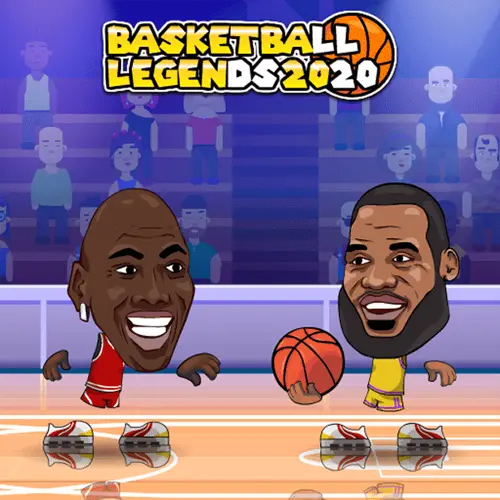
Basketball Legends 2020 is a fast 2D arcade basketball game built around short, energetic 2-on-2 contests. Its oversized, big-headed player design gives every match a playful cartoon look,…
 Works on Desktop & Mobile
Tested By XoomGames
- Test date
- August 24, 2026
- Tested on
- Chrome 150
- Device
- Desktop
- Operating system
- macOS and Windows
- Game loaded successfully
- Yes
- Fullscreen works
- Yes
- Sound works
- Yes
- Save progress
- Local browser storage
- Mobile compatibility
- Partially tested
- Keyboard controls
- Working
- Controller support
- Not detected
- Average loading time
- 4.2 seconds
- Known issues
- Minor delay after entering fullscreen
Basketball Legends 2020 not loading?
- Refresh the page.
- Disable restrictive content blockers temporarily.
- Confirm JavaScript and WebGL are enabled.
- Clear the browser cache.
- Try another modern browser.
- Close unnecessary tabs.
- Switch off VPN if the game server is blocked.
- Use the Report a Problem button if the issue continues.
Related Games
Continue Playing
Daily Challenge

Play 6 minutes today in Basketball Legends 2020.
Leaderboard
- 1Community rating4.6 ★
- 2Player likes649
- 3Total votes713
- 4Your local progress0%
Your progress is saved locally in this browser. No account required.
 Your progress is saved locally in this browser. No account required.
How to Play
The aim in Basketball Legends 2020 is to finish the match with more points than your opponent. Every decision should serve that target. When your side has a chance to attack, work toward getting the ball into the opposing hoop. When the other side is pressing for a basket, stay alert for the next chance to regain momentum and answer on the scoreboard.
- Open the game and look for the available match-start option, including Quick Match when it is shown.
- Choose a solo game against the computer or a match with friends when that option is available.
- Begin the 2-on-2 contest and keep the opponent’s hoop as your main attacking target.
- Turn openings into points by making baskets.
- Use a slam dunk opportunity when you are in position to finish an attack close to the hoop.
- Watch the score throughout the match and keep pushing for the total that puts your side ahead.
New players benefit from treating the first few possessions as a read on the match pace. The game is intentionally fast, so rushing every moment can make it harder to recognize a clear scoring opening. Instead, keep the objective in view: one successful basket is useful, but a steady series of scoring possessions is what creates separation on the scoreboard.
If you are playing against a friend, the same basics apply, but the human opponent may respond differently from one possession to the next. Avoid assuming that a move which created a basket once will automatically work again. Adjust to the flow of the contest, look for the hoop, and prioritize the next available scoring chance.
Quick Match is especially useful for players who simply want a fast arcade basketball round. It removes unnecessary delay from the start of a session and keeps the focus on the game’s main appeal: competitive 2-on-2 scoring action.
On mobile: use on-screen buttons or gestures when the game supports them.
 On mobile: use on-screen buttons or gestures when the game supports them.
Controls
- ↑Jump
- ← →Move Left / Right
- ↓Crouch
- W / ↑Climb / Interact
- S / ↓Drop / Slide
Basketball Legends 2020 uses game controls to move players and perform basketball actions during a match, but the available research does not verify a universal key-by-key control layout. For accuracy, check the instructions displayed on the game screen before starting a serious match, especially if you are playing with another person.
The actions you need to understand are straightforward: moving your player around the court, creating a basket attempt, and using a dunk when an appropriate close-range chance appears. In a two-player session, each participant should confirm their assigned inputs before the match begins so both sides can play without pausing to guess.
| Game need | What to check |
|---|---|
| Movement | Displayed direction inputs |
| Scoring | Basket action prompt |
| Dunks | Close-range action prompt |
| Two players | Separate input setup |
Use the in-game guide as the final authority because control prompts can vary between hosted versions. Learning the displayed inputs before the opening possession helps you spend more time competing and less time troubleshooting.
Game Progress & Challenges
Why Play This Game?
 Instant PlayPlay instantly in your browser.
 Free to PlayNo hidden fees.
About "Basketball Legends 2020"
Basketball Legends 2020 is a fast 2D arcade basketball game built around short, energetic 2-on-2 contests. Its oversized, big-headed player design gives every match a playful cartoon look, while the objective remains clear: put more points on the board than the opposing side before the game ends.
This is basketball in an immediate arcade format rather than a detailed sports simulation. Players can focus on getting the ball into the opponent’s hoop, creating scoring chances, and using slam dunks to finish attacks with style. The quick pace makes it a practical pick for a brief solo game against the computer or a competitive session with a friend.
Basketball Legends 2020 also stands out through its bobblehead-style basketball stars, with recognizable player-inspired characters appearing in the game’s lineup. That visual approach keeps the action light while giving matches a familiar basketball atmosphere.
For players looking through XoomGames for quick browser games, this game offers a direct route into competitive basketball action without asking you to learn a large playbook first. Start a match, chase the higher score, and make every possession count.
Gameplay
Basketball Legends 2020 centers on head-to-head scoring in compact 2-on-2 basketball matches. Each side tries to outscore its opponent by sending the ball through the other team’s hoop. The core loop is easy to understand: gain an attacking opportunity, convert it into points, respond to the other side’s scoring attempts, and keep the lead until the match is over.
The game’s arcade identity comes from its quick movement, exaggerated character proportions, and emphasis on memorable scoring moments. Regular baskets matter, but slam dunks add a more dramatic way to finish near the hoop. The large-headed visual style also makes player movement and on-court positioning easy to follow, even when a possession becomes busy.
Matches can be approached as a solo challenge against the computer or as a contest with friends. That gives the game two useful rhythms. Computer matches are suited to practicing timing and learning how quickly a scoring chance can develop. Friend matches create a more reactive contest, where each possession can change the score and momentum.
- Primary objective: score more points than the opposing side.
- Match format: 2-on-2 arcade basketball.
- Scoring focus: make baskets and use slam dunks when the opportunity is there.
- Opponent options: play against the computer or with friends.
- Visual identity: 2D courts and big-headed, bobblehead-style players.
Because the central goal is so direct, Basketball Legends 2020 rewards attention to the score rather than complicated setup. A good run of baskets can put pressure on an opponent, but every new possession remains an opportunity for the other side to answer.
Platform
Basketball Legends 2020 is presented as an online browser game, making it suited to players who want to open a game page and begin a basketball match without treating it like a long-form console sports title. Its 2D arcade presentation and short-match structure fit the quick-session expectations of browser play.
The experience is designed around immediate match access. Available game information identifies a Quick Match option as a way to begin playing straight away, which is useful when you want to skip extended preparation and move directly into a contest.
Since browser availability can depend on the page and the network being used, open the game on XoomGames and follow the game screen’s current prompts. The research available for this game does not establish separate app versions, controller support, save systems, account requirements, or specific device compatibility, so those details should not be assumed.
The reliable starting point is simple: load the game page, start an available match, and use the on-screen control guidance for the version currently running.
How to Play "Basketball Legends 2020"
The aim in Basketball Legends 2020 is to finish the match with more points than your opponent. Every decision should serve that target. When your side has a chance to attack, work toward getting the ball into the opposing hoop. When the other side is pressing for a basket, stay alert for the next chance to regain momentum and answer on the scoreboard.
- Open the game and look for the available match-start option, including Quick Match when it is shown.
- Choose a solo game against the computer or a match with friends when that option is available.
- Begin the 2-on-2 contest and keep the opponent’s hoop as your main attacking target.
- Turn openings into points by making baskets.
- Use a slam dunk opportunity when you are in position to finish an attack close to the hoop.
- Watch the score throughout the match and keep pushing for the total that puts your side ahead.
New players benefit from treating the first few possessions as a read on the match pace. The game is intentionally fast, so rushing every moment can make it harder to recognize a clear scoring opening. Instead, keep the objective in view: one successful basket is useful, but a steady series of scoring possessions is what creates separation on the scoreboard.
If you are playing against a friend, the same basics apply, but the human opponent may respond differently from one possession to the next. Avoid assuming that a move which created a basket once will automatically work again. Adjust to the flow of the contest, look for the hoop, and prioritize the next available scoring chance.
Quick Match is especially useful for players who simply want a fast arcade basketball round. It removes unnecessary delay from the start of a session and keeps the focus on the game’s main appeal: competitive 2-on-2 scoring action.
Controls
Basketball Legends 2020 uses game controls to move players and perform basketball actions during a match, but the available research does not verify a universal key-by-key control layout. For accuracy, check the instructions displayed on the game screen before starting a serious match, especially if you are playing with another person.
The actions you need to understand are straightforward: moving your player around the court, creating a basket attempt, and using a dunk when an appropriate close-range chance appears. In a two-player session, each participant should confirm their assigned inputs before the match begins so both sides can play without pausing to guess.
| Game need | What to check |
|---|---|
| Movement | Displayed direction inputs |
| Scoring | Basket action prompt |
| Dunks | Close-range action prompt |
| Two players | Separate input setup |
Use the in-game guide as the final authority because control prompts can vary between hosted versions. Learning the displayed inputs before the opening possession helps you spend more time competing and less time troubleshooting.
Can "Basketball Legends 2020" Unblocked?
Basketball Legends 2020 unblocked play means being able to access the game through a browser page when it is available on the network and device you are using. On XoomGames, the goal is to provide a straightforward route to the game so players can focus on a 2-on-2 basketball match rather than searching across multiple pages.
Network rules are set by schools, workplaces, libraries, and other connection administrators, so availability can differ from place to place. XoomGames cannot override local network restrictions. If the game page does not load in a particular environment, use a permitted connection and follow the rules that apply where you are playing.
When the page is accessible, Basketball Legends 2020 is a useful choice for a quick session: start a match, compete against the computer or friends, and aim to outscore the opposing side. Its arcade format makes the purpose clear from the first possession, with baskets and slam dunks driving the action.
For the smoothest start, open the game page, wait for the game interface to finish loading, and review the on-screen instructions before launching a match.
Tips for "Basketball Legends 2020"
The best Basketball Legends 2020 strategy begins with the scoreboard. The game is not about collecting flashy moments alone; it is about ending with more points than the opponent. Keep that target in mind when the pace becomes hectic. A reliable basket can be more valuable than forcing a low-percentage-looking attempt simply because you want a dramatic finish.
- Learn the match pace first. Use the opening moments to understand how quickly possessions develop and how much time you have to react.
- Look for clear scoring chances. Move with the purpose of getting the ball into the opponent’s hoop, not merely moving around the court.
- Use slam dunks with intent. Dunks are a highlighted part of the game, but they are most useful when you have created a close-range opportunity.
- Track the score continuously. A small lead changes how urgently you need to attack, while a deficit tells you every successful basket matters.
- Practice against the computer. Solo matches offer a low-pressure way to become familiar with the game’s speed before challenging a friend.
- Adapt in friend matches. A human opponent can change approach quickly, so do not rely on repeating the same attack without reading the response.
Positioning is the practical bridge between movement and points. Instead of treating every possession as a random rush toward the hoop, try to recognize when you are actually in range to convert a basket or attempt a dunk. That small pause in decision-making can make your attacks more purposeful.
In 2-on-2 play, the court can feel crowded compared with a one-on-one arcade game. Keep your attention on the hoop, the ball, and the current score. Those three reference points prevent the action from becoming visually overwhelming and help you identify what matters on the next possession.
Finally, use Quick Match when you want rapid repetition. Short starts make it easier to play several rounds, notice which situations lead to points, and apply that knowledge in the next contest.
Features "Basketball Legends 2020"
Basketball Legends 2020 combines recognizable basketball goals with an exaggerated arcade presentation. The result is a game that is easy to read at a glance: two sides compete on a 2D court, the players have oversized bobblehead proportions, and the winning side is the one that scores more baskets.
- 2-on-2 basketball matches: compete in small-team contests where each possession can quickly affect the score.
- Fast arcade pace: the game prioritizes direct basketball action instead of a detailed simulation structure.
- Big-headed player style: oversized character designs give the game its distinct cartoon personality.
- Basket scoring: the central objective is to put the ball through the opponent’s hoop and finish ahead.
- Slam dunks: close-range finishing provides a more emphatic scoring option.
- Computer opponents: play solo against the computer for a quick basketball challenge.
- Friend competition: play with friends for a more competitive local-style match experience.
- Quick Match access: start playing promptly when the option is available.
The player presentation is another notable part of the game. Basketball-inspired bobblehead characters include figures associated with well-known names such as Luka Doncic, James Harden, and LeBron James. This gives the game a playful connection to modern basketball culture without changing its accessible arcade focus.
A useful difference between Basketball Legends 2020 and a deeper sports simulator is its concentration on the essentials. You are not asked to master a complicated tactical system before enjoying a match. The meaningful decisions happen on the court: when to press for a basket, when a dunk opportunity has appeared, and how to keep pace with an opponent trying to outscore you.
That focused design makes the game suitable for both quick solo rounds and friendly score-chasing sessions. The rules are recognizable, the visual style is distinctive, and the action stays centered on basketball’s clearest contest: who can make more shots.
Best "Basketball Legends 2020" Similar Games & Top Picks
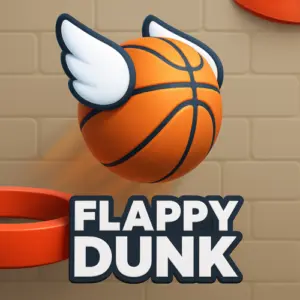
- Flappy Dunk: Play Flappy Dunk unblocked on XoomGames. Tap to guide the ball through hoops, build points, and chase a higher score in your browser.
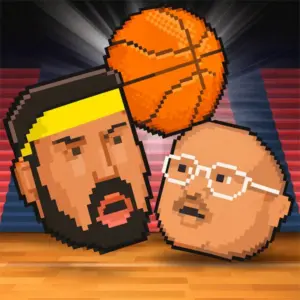
- Sports Heads Basketball: Play Sports Heads Basketball unblocked on XoomGames. Choose a big-headed player, score baskets, use bonuses, and challenge a friend in your browser.
- Flip Diving: A quick browser game pick from the same collection.
- Penalty Kick Online: Play Penalty Kick Online unblocked on XoomGames. Aim for top-corner shots, earn XP, level up, and compete online in your browser.
- G-Switch 3: Play G-Switch 3 unblocked on XoomGames. Flip gravity, dodge traps, and test your timing in a fast browser skill game.
FAQ - Basketball Legends 2020
What is Basketball Legends 2020?
Basketball Legends 2020 is a 2D arcade basketball game with big-headed, bobblehead-style players. It features fast 2-on-2 matches in which the goal is to score more points than the opposing side by putting the ball into the opponent’s hoop.
How do you win Basketball Legends 2020?
You win by finishing the match with a higher score than your opponent. Focus on converting scoring opportunities into baskets, using slam dunks when a close-range opportunity is available, and responding when the other side puts points on the board.
Is Basketball Legends 2020 a 2-player game?
Yes. Available game information describes Basketball Legends as a two-player game that can be played with friends. It also supports play against the computer, so it works both as a solo arcade challenge and as a competitive match with another player.
Can I play against the computer?
Yes. You can play Basketball Legends 2020 against the computer. This is a useful way to get comfortable with the game’s quick pace, learn the currently displayed control prompts, and practice turning scoring chances into points before playing with a friend.
What is Quick Match in Basketball Legends 2020?
Quick Match is an option identified as a way to start playing immediately. It is useful when you want to jump straight into a basketball contest rather than spend extra time preparing. Availability and the exact menu presentation should be checked on the active game screen.
Are slam dunks in Basketball Legends 2020?
Yes. Slam dunks are part of the game’s scoring action. They are an especially noticeable way to finish near the hoop, alongside regular baskets. The main objective remains the same regardless of scoring style: build a higher point total than the opponent.
Who are the players in Basketball Legends 2020?
The game uses iconic basketball player-inspired characters in a bobblehead form. Available information specifically associates the lineup with names including Luka Doncic, James Harden, and LeBron James. The exaggerated character design is one of the game’s most recognizable visual features.
Can Basketball Legends 2020 be played unblocked?
You can try to play Basketball Legends 2020 unblocked through XoomGames when the page is accessible on your browser and network. Access can vary because schools, workplaces, libraries, and other networks may apply their own rules. Always use a permitted connection and follow local policies.



 Report a Problem
Comments About Basketball Legends 2020